
How do I troubleshoot a digital pressure gauge with an incorrect reading?
Leave a message

Troubleshooting a digital pressure gauge with an incorrect reading can be a challenging yet essential task, especially when you're a supplier like me. In the field of pressure measurement, digital pressure gauges are widely used for their accuracy and reliability. However, like any other instrument, they can encounter issues that lead to inaccurate readings. In this blog, I'll share some insights and steps on how to troubleshoot these problems effectively.
Understanding the Basics of Digital Pressure Gauges
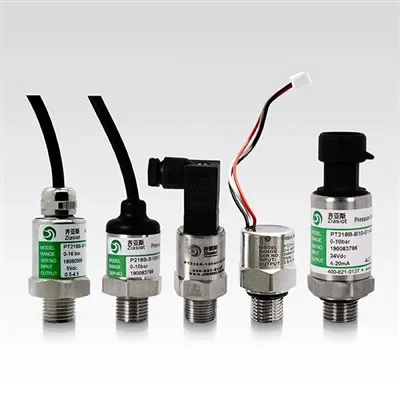
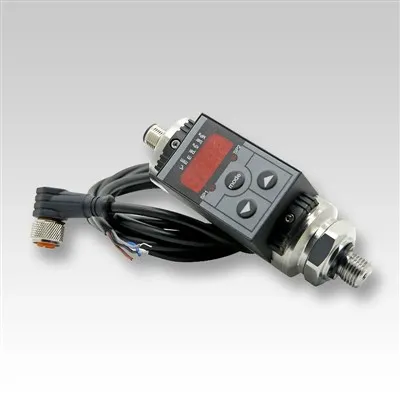
Before we dive into troubleshooting, it's crucial to understand how digital pressure gauges work. These gauges typically consist of a pressure sensor, signal conditioning circuitry, and a digital display. The pressure sensor converts the physical pressure into an electrical signal, which is then processed by the circuitry and displayed on the screen.
As a Digital Pressure Gauge supplier, I've seen various types of gauges, including Vacuum Digital Pressure Gauge, Digital Melt Presssure Gauges, and High Temperature Mechanical Melt Presssure Gauges. Each type has its unique features and applications, but the basic troubleshooting principles remain similar.
Initial Checks
When you notice an incorrect reading on a digital pressure gauge, the first step is to perform some initial checks. These checks are simple yet can often identify the root cause of the problem.
Power Supply
The power supply is a common culprit for inaccurate readings. Check if the gauge is properly powered. If it's battery-operated, ensure that the batteries are fresh and installed correctly. Low battery voltage can cause the gauge to malfunction or display incorrect readings. For gauges powered by an external power source, verify that the power cable is securely connected and the voltage is within the specified range.
Physical Damage
Inspect the gauge for any physical damage. Look for cracks, dents, or signs of impact on the housing, display, or sensor. Physical damage can affect the internal components of the gauge, leading to inaccurate readings. If you find any damage, it may be necessary to replace the gauge or repair the damaged parts.
Connection and Installation
Ensure that the gauge is correctly connected to the pressure source. Check the fittings and connections for any leaks or loose connections. A leak in the pressure line can cause the gauge to read lower than the actual pressure. Also, make sure that the gauge is installed in the correct orientation. Some gauges are designed to be installed vertically or horizontally, and incorrect installation can affect the accuracy of the readings.
Calibration Checks
If the initial checks don't reveal any issues, the next step is to perform calibration checks. Calibration is the process of adjusting the gauge to ensure that it provides accurate readings.
Zero Calibration
Zero calibration is used to set the gauge to read zero when there is no pressure applied. To perform zero calibration, disconnect the gauge from the pressure source and allow it to reach atmospheric pressure. Then, follow the manufacturer's instructions to perform the zero calibration. This typically involves pressing a button or using a calibration tool to adjust the gauge to read zero.
Span Calibration
Span calibration is used to adjust the gauge to read accurately at a specific pressure. To perform span calibration, you'll need a known pressure source, such as a pressure calibrator. Apply the known pressure to the gauge and compare the reading on the gauge with the known pressure. If there is a difference, follow the manufacturer's instructions to adjust the span calibration. This may involve adjusting a potentiometer or using a calibration tool to fine-tune the gauge.
Sensor and Circuitry Checks
If the calibration checks don't resolve the issue, the problem may lie with the sensor or the circuitry. These components are more complex and may require specialized tools and knowledge to troubleshoot.
Sensor Testing
The pressure sensor is the heart of the digital pressure gauge. If the sensor is faulty, it can cause inaccurate readings. To test the sensor, you'll need a multimeter or a sensor tester. Follow the manufacturer's instructions to measure the output of the sensor at different pressures. Compare the measured values with the specifications provided by the manufacturer. If the sensor output is outside the specified range, the sensor may be faulty and need to be replaced.
Circuitry Inspection
Inspect the circuitry of the gauge for any signs of damage or malfunction. Look for loose connections, burnt components, or signs of corrosion. If you're familiar with electronics, you can use a multimeter to test the voltage and resistance of the components in the circuitry. However, if you're not comfortable working with electronics, it's best to seek the help of a professional technician.
Environmental Factors
Environmental factors can also affect the accuracy of digital pressure gauges. Extreme temperatures, humidity, and vibration can all cause the gauge to malfunction or display incorrect readings.
Temperature Effects
Most digital pressure gauges have a specified operating temperature range. If the gauge is exposed to temperatures outside this range, it can cause the sensor to drift or the circuitry to malfunction. If you suspect that temperature is the cause of the problem, move the gauge to a more suitable environment and allow it to stabilize before taking any further readings.
Humidity and Moisture
High humidity or moisture can cause corrosion and damage to the internal components of the gauge. If the gauge is exposed to a humid environment, check for signs of moisture inside the housing. If there is moisture, dry the gauge thoroughly and ensure that it is properly sealed to prevent further moisture ingress.
Vibration and Shock
Excessive vibration or shock can cause the internal components of the gauge to loosen or become damaged. If the gauge is installed in an environment with high levels of vibration, consider using vibration isolation mounts or shock absorbers to protect the gauge.
Conclusion
Troubleshooting a digital pressure gauge with an incorrect reading requires a systematic approach. By performing initial checks, calibration checks, sensor and circuitry checks, and considering environmental factors, you can often identify and resolve the problem. However, if you're unable to troubleshoot the issue on your own, don't hesitate to contact the manufacturer or a professional technician for assistance.
As a Digital Pressure Gauge supplier, I'm committed to providing high-quality products and excellent customer service. If you're experiencing issues with your digital pressure gauge or are looking to purchase a new gauge, I encourage you to contact me for more information and to discuss your specific needs. We can work together to find the best solution for your pressure measurement requirements.


References
- Manufacturer's manuals and specifications for digital pressure gauges.
- Industry standards and guidelines for pressure measurement and calibration.